使用 Swift export 与 Swift 互操作
Kotlin 能够通过 Swift export 与 Swift 互操作, 这个功能目前处于 Alpha 阶段. Swift export 能够直接导出 Kotlin 源代码, 并以符合 Swift 习惯的方式, 从 Swift 调用 Kotlin 代码, 因此不需要 Objective-C 头文件.
Swift export 使针对 Apple 目标平台的跨平台开发更加流畅. 例如, 如果你有一个包含顶层函数的 Kotlin 模块, Swift export 可以实现简洁的, 特定于模块的导入, 消除令人困惑的 Objective-C 下划线和混淆的名称.
Swift export 当前的功能包括:
多模块支持. 每个 Kotlin 模块作为独立的 Swift 模块导出, 简化了函数调用.
包支持. 在导出期间明确的保留 Kotlin 包, 避免在生成的 Swift 代码中发生命名冲突.
类型别名. Kotlin 类型别名在导出时会保留在 Swift 中, 提高可读性.
对于基本类型, 增强可空性. 与 Objective-C 的互操作, 需要将
Int?等类型装箱为KotlinInt之类的包装类, 来保留可空性, 与此不同, Swift export 能够直接转换可空性信息.重载. 你可以在 Swift 中调用 Kotlin 的重载函数, 不会发生歧义.
扁平化的包结构. 你可以将 Kotlin 包转换为 Swift 枚举, 在生成的 Swift 代码中删除包前缀.
自定义模块名称. 你可以在 Kotlin 项目的 Gradle 配置中, 自定义生成的 Swift 模块名称.
并发支持. 你可以从 Swift 无缝的调用 Kotlin 的挂起代码, 并直接将
kotlinx.coroutines流(Flow)导出为 Swift 的AsyncSequence.
启用 Swift export
Swift export 目前处于 Alpha 阶段, 还不完整, 因此预计会有破坏性变更. 要试用这个功能, 请在你的 Kotlin 项目中 配置构建文件, 并 设置 Xcode 集成 Swift export.
配置 Kotlin 项目
你可以在项目中使用以下构建文件, 作为设置 Swift export 的起点:
Kotlin 编译器会自动生成所有需要的文件 (包括 swiftmodule 文件, .a 静态库, 头文件, 以及 modulemap 文件), 并将它们复制到应用程序的构建目录中, 你可以从 Xcode 访问这些文件.
配置 Xcode 项目
配置 Xcode, 将 Swift export 集成到你的项目中, 方法如下:
在 Xcode 中, 打开项目设置.
在 Build Phases 页面, 找到包含
embedAndSignAppleFrameworkForXcode任务的 Run Script 阶段.在 Run Script 阶段中, 将脚本替换为
embedSwiftExportForXcode任务:./gradlew :<Shared module name>:embedSwiftExportForXcode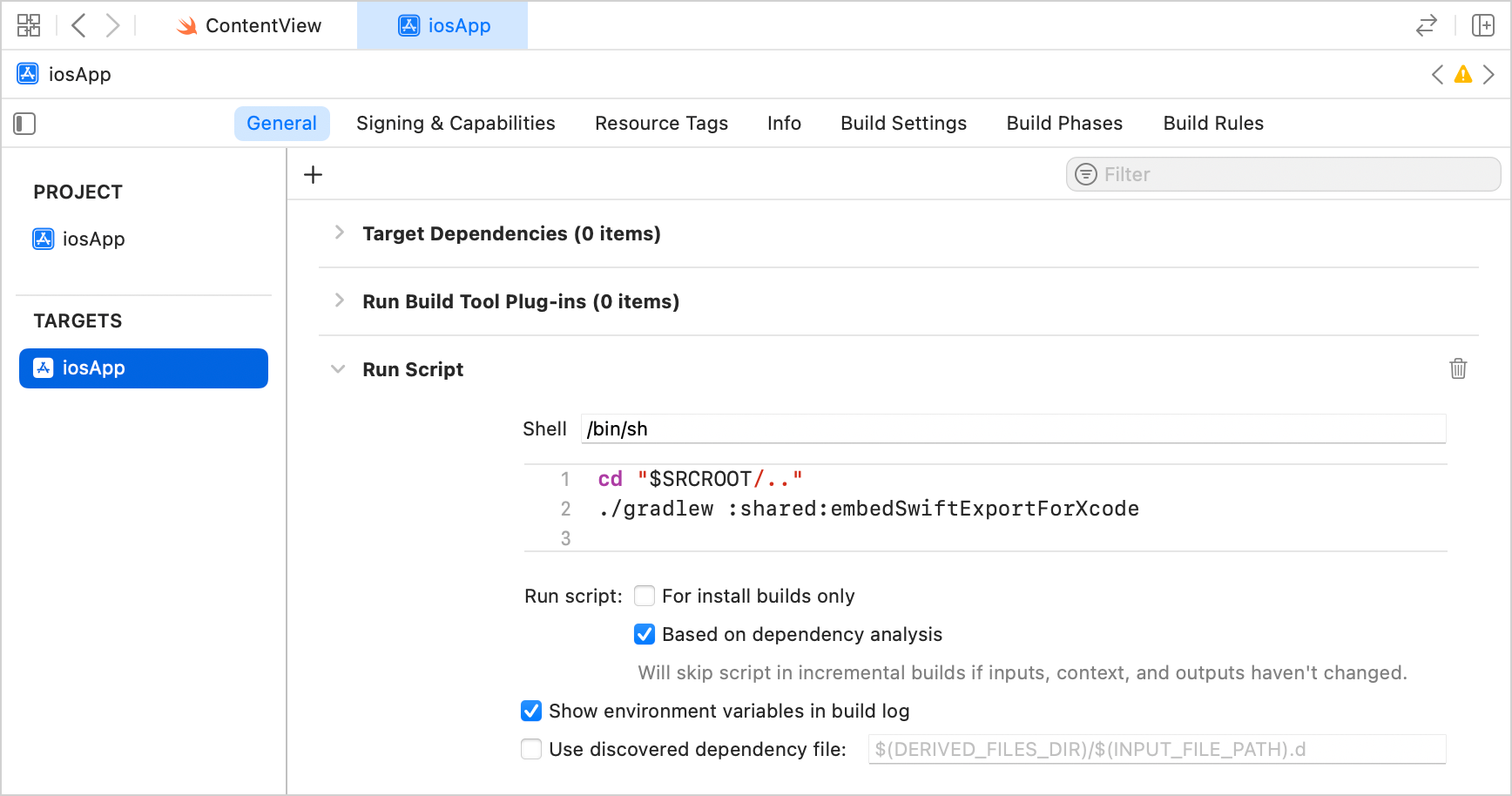
构建项目. 构建会在输出目录中生成 Swift 模块.
当前的限制
Swift export 目前只能用于使用 直接集成 将 iOS 框架连接到 Xcode 项目的项目. 这是通过 IntelliJ IDEA 中的 Kotlin Multiplatform plugin 创建的, 或通过 Web 向导 创建的 Kotlin Multiplatform 项目的标准配置.
其他已知的问题包括:
继承自
List,Set或Map的类型, 在导出时会被忽略 (KT-80416).List,Set或Map的继承者, 在 Swift 端无法实例化 (KT-80417).导出到 Swift 时, Kotlin 泛型类型参数会被类型擦除, 变成它的上界类型.
没有可用的 IDE 迁移提示或自动化工具.
使用需要使用者同意(Opt-in)的声明时, 你必须在 Gradle 构建文件的 模块级别 添加明确的
optIn编译器选项. 例如, 对于kotlinx.datetime库:swiftExport { moduleName = "Shared" export("org.jetbrains.kotlinx:kotlinx-datetime:0.8.0") { moduleName = "KotlinDateTime" flattenPackage = "kotlinx.datetime" } } // 在模块级别添加单独的 opt-in 代码块 compilerOptions { optIn.add("kotlin.time.ExperimentalTime") }
映射关系
下表说明 Kotlin 的概念如何映射到 Swift.
Kotlin | Swift |
|---|---|
| |
带 | |
| |
| |
| |
Function | |
| |
| |
Property | |
Initializer | |
Nested enum | |
|
|
|
|
|
|
|
|
|
|
|
|
|
|
|
|
|
|
|
|
|
|
|
|
|
|
|
|
|
声明
类
Swift export 只支持直接继承自 Any 的 final 类, 例如 class Foo(). 它们会被转换为继承自特殊的 KotlinBase 类的 Swift 类:
对象
对象会被转换为带有 private init 和 static shared 访问器的 Swift 类:
类型别名
Kotlin 类型别名会原样导出:
枚举
Kotlin enum class 声明会导出为通常的原生 Swift enum 类型:
Sealed 类和接口
Kotlin 中定义的 sealed 继承层级结构会映射为 Swift 的枚举, 从而支持穷尽的 switch 语句.
Swift export 会在每个 sealed 类型上生成 .sealedType() 方法. 这个方法返回一个 Swift 枚举, 它的 case 与 sealed 继承层级结构的直接子类相对应. 可以嵌套调用这些方法, 来匹配继承层级结构中更深的层次.
例如, 在 Kotlin 中声明带有类层级结构的 sealed 接口:
在 Swift 端, 可以使用穷尽的 switch, 不需要 default case:
由于 switch 是穷尽的, 如果 sealed 的继承层级结构中增加了新的子类, 编译器会发出警告. 因此可以立即处理新的子类, 而不是依赖 switch 的 default case.
函数
Swift export 支持简单的顶层函数和方法:
对于 Kotlin 的扩展函数, 接收者参数会成为 Swift 中位于第一个的普通参数:
Kotlin 带有 vararg 的函数, 会映射到 Swift 的可变参数函数:
属性
Kotlin 属性会被转换为 Swift 属性:
构造函数
构造函数会被转换为 Swift 初始化器:
类型
kotlin.Nothing
Kotlin 的 Nothing 类型会被转换为 Never 类型:
分类器类型(Classifier Type)
Swift export 目前只支持直接继承自 Any 的 final 类.
包
Kotlin 包会被转换为嵌套的 Swift 枚举, 以避免命名冲突:
并发
挂起函数
你可以从 Swift 调用 Kotlin 的挂起代码. Kotlin 挂起函数 和挂起函数类型, 会被导出为 Swift 的 async 函数和函数类型:
流(Flow)
你还可以将 kotlinx.coroutines 流(Flow)导出为 Swift 的 AsyncSequence:
协程派发器(Coroutine Dispatcher)
默认情况下, 当你从 Swift 调用 Kotlin 挂起函数, 或使用 asAsyncSequence 函数时, Kotlin 会创建一个协程上下文(Coroutine Context), 它使用 Dispatchers.Default 派发器, 并在这个协程上下文中执行导出的代码.
要在 不同的派发器 上运行导出的代码, 请在 Kotlin 中使用 withContext() 函数切换协程上下文. 例如:
跨语言继承
Swift export 支持跨语言继承. 这个功能的一个常见用例是 反向导入模式: 在 Kotlin 中定义契约, 并在 Swift 端提供平台特定的实现. 当你需要使用无法直接导入 Kotlin 的纯 Swift 库时, 这种模式尤其有用.
要实现这种模式, 需要声明可供 Swift 实现继承的 Kotlin 接口和 Kotlin 超类. 然后在 Swift 中实现这个接口, 并将 Swift 对象传递给接受这个接口的 Kotlin 函数. 例如, 对于 CryptoKit 库:
在 Kotlin 端, 声明一个接口, 一个接受它的函数, 以及一个
open的基类:// Kotlin 代码 interface CryptoProvider { fun hashMD5(input: String): String } fun processHash(provider: CryptoProvider, input: String): String = provider.hashMD5(input) open class SwiftBase在 Swift 端, 从导出的
SwiftBase类继承, 使用纯 Swift 库实现接口, 并将对象传回 Kotlin:// Swift 代码 import CryptoKit final class IosCryptoProvider: SwiftBase, CryptoProvider { func hashMD5(input: String) -> String { guard let data = input.data(using: .utf8) else { return "failed" } return Insecure.MD5.hash(data: data).description } } let provider = IosCryptoProvider() // 调用 Kotlin 函数, 这个函数会回调 Swift 中的 hashMD5() print(processHash(provider: provider, input: "Hello, world!"))
当 Kotlin 收到 Swift 对象时, 会将其当作通常的 Kotlin 接口的实现, 并直接调用 Swift 代码.
Swift export 的演进
我们计划在未来的 Kotlin 版本中扩展 Swift export 的功能, 并逐步稳定, 改善 Kotlin 和 Swift 之间的互操作性. 你可以在以下地方留下你的反馈意见:
在 Kotlin Slack 中 - 获取邀请, 并加入 #swift-export 频道.
在 YouTrack 中报告问题.